

近期查看的产品
NBP 110 D
建筑工程规范
选择一个产品编号:
复制文本
已复制!
发生错误。请稍后重试。
NBP 110 D
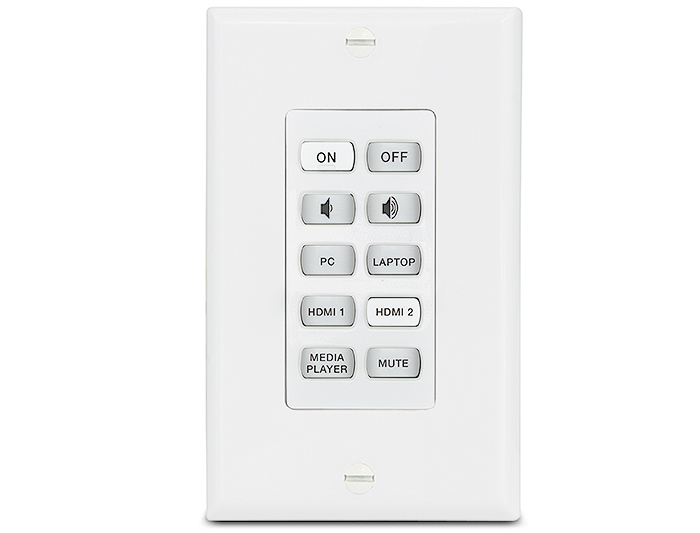
- Provide an ethernet enabled, one-gang decorator-style network button panel for remotely controlling AV devices when paired with an Extron IP Link Pro control processor, HC 403, or HC 404.
- Fully-customizable ethernet enabled button panel interface.
- Device shall have a total of ten fully-customizable soft-touch, backlit buttons.
- Buttons shall illuminate white when active and should have the ability to flash.
- Buttons shall feature two levels of illumination, dim and bright.
- Button text shall be able to be customized by selected from pre-packaged kits or may be ordered individually using an online custom button application.
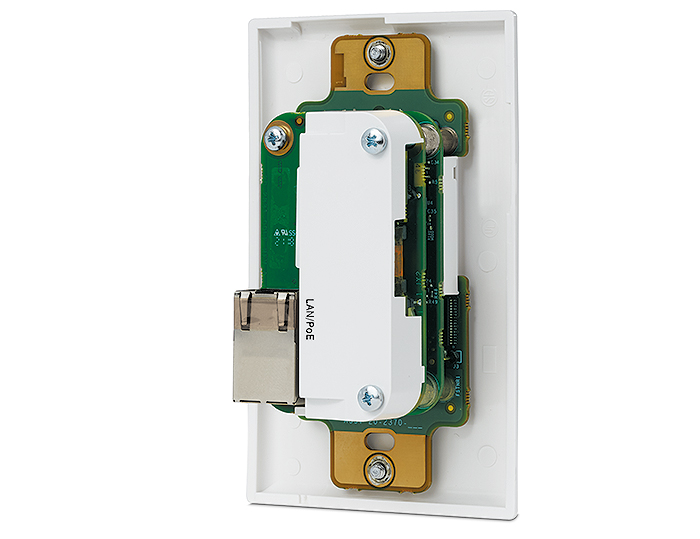
- Device shall have a female RJ-45 jack located on the back of the enclosure that supports 10/100Base-T, half/full duplex with auto-detect for connection to a LAN or WAN and includes link and activity LED indicators located on the left and right of the jack for troubleshooting network issues as well as supports PoE- Power over Ethernet, 802.3af.
- Device shall include a multi-function button located below the faceplate on the left front side of the product that allows for the reset of the device or its communication properties at minimum.
- Device shall be Section 508 compliant and shall meet or exceed U.S. accessibility standards for Electronic Information Technology.
- Supports a web-based AV resource management application that provides a means to manage, monitor, and control AV equipment.
- Device shall be controllable using Extron Control for Web, Android, and iOS as a secondary point of control.
- Device shall support the following protocols: DHCP, DNS, HTTP, HTTPS, ICMP, SFTP, SSH, TCP/IP, UDP/IP.
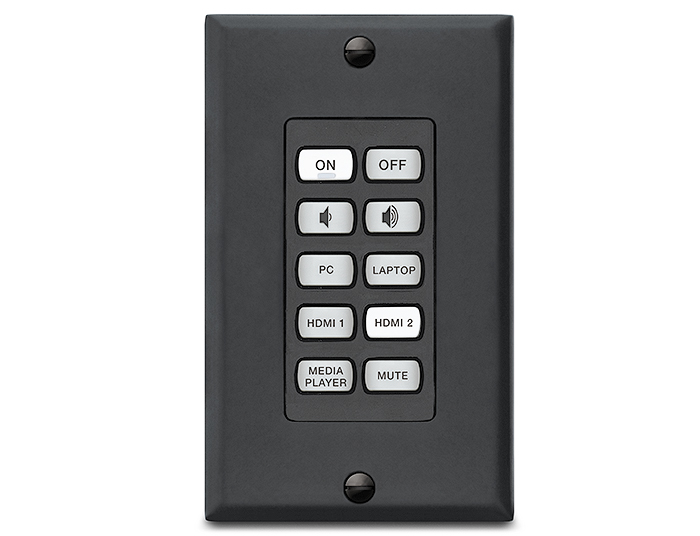
- Device shall include both white and black faceplates.
- Device shall have a total of ten fully-customizable soft-touch, backlit buttons.
- Mounting requirements
- Device shall have the ability to be mounted directly in a wall, lectern, or other flat surface and shall be able to be secured using the supplied mud ring and hardware.
- Device shall have the ability to be mounted to the surface of a wall using an optional wall box.
- Software requirements
- The device may only be configured or programmed using Extron’s Global Configurator Plus or Professional, or Global Scripter respectively.
- Shall be configured or programmed by an Extron authorized user.
- The device’s configuration and settings shall be managed using Extron’s Toolbelt software.
- Security requirements
- Device shall support SSH for secure communication between the network button panel and the control processor or the meeting space collaboration system.
- Device shall support SFTP and SSH for secure communication between the control processor and the configuration or programming software.
- Device shall provide the option to modify administrator and user credentials.
- Device shall support security updates to maintain network health.
- Device shall require that a Secure Socket Layer (SSL) Certificate is installed to maintain system confidentiality and data integrity.
- Device shall support the installation of an owner furnished certificate with the following properties:
- Certificates shall include x.509 support
- Certificates shall include public / private key exchange
- Certificates shall support PEM encoding
- Extron shall furnish documentation that describes all supported network ports and services.
- Shall meet regulatory compliances
- CE
- c-UL
- UL
- C-Tick
- FCC Class B
- ICES
- VCCI
- RoHS
- WEEE
- Product Warranty
- Shall provide at least 3 years parts and labor
- Approved device shall be the Extron NBP 110 D, part number 60-1689-01; no alternates or equals
- Fully-customizable ethernet enabled button panel interface.
NBP 110 D
- Provide an ethernet enabled, one-gang decorator-style network button panel for remotely controlling AV devices when paired with an Extron IP Link Pro control processor, HC 403, or HC 404.
- Fully-customizable ethernet enabled button panel interface.
- Device shall have a total of ten fully-customizable soft-touch, backlit buttons.
- Buttons shall illuminate white when active and should have the ability to flash.
- Buttons shall feature two levels of illumination, dim and bright.
- Button text shall be able to be customized by selected from pre-packaged kits or may be ordered individually using an online custom button application.
- Device shall have a female RJ-45 jack located on the back of the enclosure that supports 10/100Base-T, half/full duplex with auto-detect for connection to a LAN or WAN and includes link and activity LED indicators located on the left and right of the jack for troubleshooting network issues as well as supports PoE- Power over Ethernet, 802.3af.
- Device shall include a multi-function button located below the faceplate on the left front side of the product that allows for the reset of the device or its communication properties at minimum.
- Device shall be Section 508 compliant and shall meet or exceed U.S. accessibility standards for Electronic Information Technology.
- Supports a web-based AV resource management application that provides a means to manage, monitor, and control AV equipment.
- Device shall be controllable using Extron Control for Web, Android, and iOS as a secondary point of control.
- Device shall support the following protocols: DHCP, DNS, HTTP, HTTPS, ICMP, SFTP, SSH, TCP/IP, UDP/IP.
- Device shall include both white and black faceplates.
- Device shall have a total of ten fully-customizable soft-touch, backlit buttons.
- Mounting requirements
- Device shall have the ability to be mounted directly in a wall, lectern, or other flat surface and shall be able to be secured using the supplied mud ring and hardware.
- Device shall have the ability to be mounted to the surface of a wall using an optional wall box.
- Software requirements
- The device may only be configured or programmed using Extron’s Global Configurator Plus or Professional, or Global Scripter respectively.
- Shall be configured or programmed by an Extron authorized user.
- The device’s configuration and settings shall be managed using Extron’s Toolbelt software.
- Security requirements
- Device shall support SSH for secure communication between the network button panel and the control processor or the meeting space collaboration system.
- Device shall support SFTP and SSH for secure communication between the control processor and the configuration or programming software.
- Device shall provide the option to modify administrator and user credentials.
- Device shall support security updates to maintain network health.
- Device shall require that a Secure Socket Layer (SSL) Certificate is installed to maintain system confidentiality and data integrity.
- Device shall support the installation of an owner furnished certificate with the following properties:
- Certificates shall include x.509 support
- Certificates shall include public / private key exchange
- Certificates shall support PEM encoding
- Extron shall furnish documentation that describes all supported network ports and services.
- Shall meet regulatory compliances
- CE
- c-UL
- UL
- C-Tick
- FCC Class B
- ICES
- VCCI
- RoHS
- WEEE
- Product Warranty
- Shall provide at least 3 years parts and labor
- Approved device shall be the Extron NBP 110 D, part number 60-1689-01; no alternates or equals
- Fully-customizable ethernet enabled button panel interface.
把商品添加到购物车
Order Message Number
产品编号
注: 使用通用交流电源插座的 Extron 产品可支持多种不同的交流电源插头类型。在使用之前,确保设备满足您所在区域的所有规定要求,并符合所有应用的本地安全和电气规程及标准。
当前总计:
Annotation Graphics Processor
To view this page ensure that Adobe Flash Player version
11.0.0 or greater is installed and enabled.

 Chrome
 Firefox
 Edge
Edge
 Safari